
TL;DR:
- App store rejections mainly result from technical issues, privacy violations, or misleading content.
- Common reasons include crashes, poor metadata, privacy breaches, and non-compliance with platform guidelines.
- Most rejections are fixable through careful review, documented updates, and prompt resubmission.
About one in four apps submitted to Apple’s App Store gets rejected on the first try. In 2024, 1.93 million apps were turned away out of 7.77 million submissions. For a small team or solo developer, a rejection doesn’t just sting — it delays revenue, drains momentum, and can feel completely mysterious without the right context. The good news is that most rejections share predictable patterns. This guide breaks down what app store rejection actually means, the most common causes on both Apple and Google Play, hidden traps that surprise even veteran developers, and a step-by-step recovery plan to help you get approved faster.
Table of Contents
- What app store rejection means (and why it happens)
- Top reasons apps get rejected: Apple vs. Google Play
- What most developers miss: hidden traps and gray areas
- How to recover: fixing, documenting, and resubmitting your app
- Why common-sense isn’t enough: lessons from hard-won experience
- Smart tools for boosting your app store approval
- Frequently asked questions
Key Takeaways
| Point | Details |
|---|---|
| App store rejection is common | About a quarter of submissions face rejection but can often be fixed with careful review. |
| Know the major pitfalls | Performance, privacy, and metadata issues are the leading causes on both Apple and Google Play. |
| Address subjective criteria | Design standards, edge-case rules, and communication with reviewers are just as important as technical checks. |
| Recovery is possible | Most rejected apps succeed on resubmission if clear fixes and notes are provided. |
| Proactive preparation pays off | Using tools, checklists, and real-device testing reduces surprises at review time. |
What app store rejection means (and why it happens)
App store rejection is not a life sentence. It’s a formal notice that your submission didn’t meet a platform’s standards in one or more areas — and understanding which platform you’re dealing with shapes everything about how you respond.
Apple’s process is manual and expert-driven. Every submission gets reviewed by a human evaluator who checks your app against the App Store Review Guidelines, covering technical performance, content appropriateness, privacy compliance, and design quality. Apple reviewers have real authority to reject apps they feel are low-effort, even if no single rule is technically broken.
Google Play uses a hybrid model. Automated tools handle the first pass, scanning for malware, policy violations, and obvious compliance gaps. Human reviewers step in for more nuanced cases. Google Play rejections happen when an app violates Developer Program Policy, which is a detailed rulebook covering content, monetization, privacy, and user safety.
Here’s a quick comparison of how both platforms approach review:
| Factor | Apple App Store | Google Play |
|---|---|---|
| Review type | Manual (human-first) | Hybrid (automated + human) |
| Primary focus | Design quality, performance | Policy compliance, security |
| Review time | 1 to 7 days typically | Hours to a few days |
| Rejection notice | Detailed reviewer notes | Resolution Center alerts |
| Resubmission | Allowed after fixes | Allowed after fixes |
“A rejection is not the end of the road — it’s a specific note about what needs to change. Most apps that get rejected do eventually get approved after revision.”
Both platforms share some common ground: crashes, incomplete metadata, and privacy non-compliance will get you rejected on either store. But Apple’s quality bar is more subjective, while Google leans harder on policy specifics. Understanding this distinction helps you figure out app store compliance essentials before you even click submit. Reviewing submission rules and visuals in advance saves you from the most avoidable mistakes.
Top reasons apps get rejected: Apple vs. Google Play
Knowing why apps fail is the fastest shortcut to preventing rejection. The patterns are surprisingly consistent.
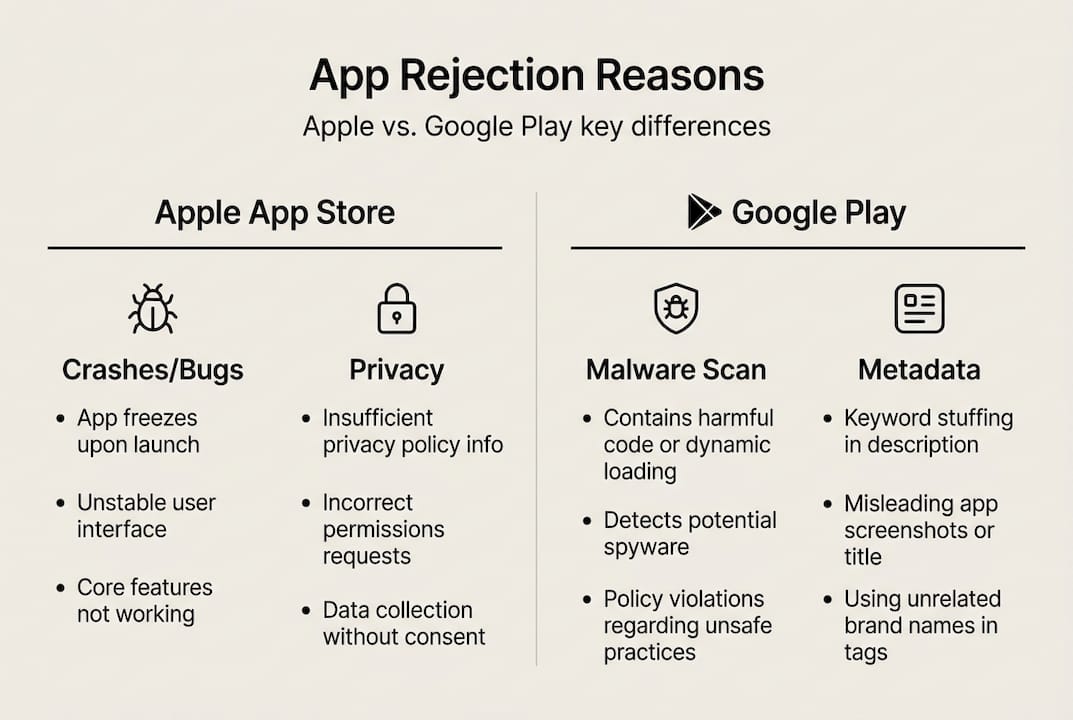
Apple organizes its review criteria into five categories: Safety, Performance, Business, Design, and Legal. In 2024, performance was the top rejection driver, with 1.23 million rejections linked to crashes and technical issues. Legal (privacy and data collection), design, and business-model violations rounded out the top causes.
Google Play’s most common rejection triggers look slightly different:
- Restricted content: Adult content, gambling features, or regulated goods without proper approvals
- Privacy policy violations: Missing or misleading data disclosures
- Excessive permissions: Requesting access to device features unrelated to the app’s core purpose
- Device compatibility issues: Apps that fail on specific screen sizes or OS versions
- Metadata policy violations: Keyword stuffing in the title or misleading screenshots
Here’s a side-by-side breakdown of the most common rejection reasons:
| Rejection category | Apple App Store | Google Play |
|---|---|---|
| App crashes/bugs | Very common | Common |
| Privacy/data issues | Top 3 reason | Common |
| Misleading metadata | Common | Very common |
| Low-effort/duplicate apps | Common | Moderate |
| Permissions overreach | Moderate | Very common |
| Content policy violation | Moderate | Very common |
One edge case that trips up a lot of developers: Apple requires that iPhone apps also run well on iPad unless you explicitly restrict compatibility. A forgotten iPad layout or broken UI can tank an otherwise solid submission. Another surprise: Google has ramped up AI-powered spam detection, flagging apps that look auto-generated or reuse templated content without original functionality.
For teams focused on improving listing quality, it’s worth noting that screenshots and preview images are reviewed too. Misleading visuals or images that don’t match the actual app are an increasingly common reason for rejection. If you’re preparing your first launch, a step-by-step indie submission guide will help you sequence everything correctly.
What most developers miss: hidden traps and gray areas
The obvious rejection causes get plenty of coverage. The ones below? Not so much.
One of the most consistent hidden traps is the guest mode requirement. Apple expects apps with account-based features to offer a way for reviewers to explore the app without creating an account. Skip this, and a reviewer who can’t test the app’s functionality will reject it outright. Many first-time developers don’t learn this until their first rejection email arrives.
Edge cases like IPv6 networking, mandatory preview modes, and iPad compatibility issues regularly catch even experienced teams off guard. Apple’s test environments use IPv6-only networks, so apps that rely exclusively on IPv4 will fail connectivity checks during review.
Here are the hidden traps worth adding to your preflight checklist:
- No guest/demo mode: Reviewers need access to your app’s core features without having to sign up
- Inaccurate privacy nutrition labels: Claiming you collect less data than you actually do is a fast path to rejection
- WebView wrapper apps: Apps that are just websites wrapped in a shell browser rarely pass Apple’s minimum functionality standard
- Incomplete iPad support: Your iPhone app needs to either support iPad layouts or explicitly declare it won’t run on iPad
- Broken external links in metadata: App description links that return errors signal a low-quality submission
- AI-generated placeholder content: Google’s spam filters are increasingly good at detecting apps built on bulk-generated templates
The subjective category is also worth understanding. Apple reserves the right to reject apps it considers “copycat” designs or apps that duplicate existing functionality without adding clear value. There’s no hard rule for this, which is exactly what makes it dangerous. Your listing checklist should include a self-audit of how your app differentiates itself.
Pro Tip: Before submitting, have someone unfamiliar with your app try to use it cold, without any instructions. If they can’t figure out the core feature within 60 seconds, a reviewer probably won’t either. Check the latest visual trends 2026 to make sure your screenshots reflect modern standards and don’t look templated.
How to recover: fixing, documenting, and resubmitting your app
Getting rejected isn’t failure. It’s feedback. In 2024, roughly 295,000 apps were approved after initial rejection. The recovery process is learnable.
Here’s a clear path through it:
- Read the rejection notes carefully: Apple provides specific guideline numbers. Find the exact rule you violated before assuming you understand the fix
- Reproduce the issue on a real device: Simulators miss things. Test on actual hardware matching the reviewer’s specs when possible
- Fix only what the notes describe: Submitting unrelated changes alongside fixes can trigger new review flags
- Document every change you made: Keep a changelog of what you fixed and why — this becomes your resubmission message
- Write a clear note to the reviewer: Use the resolution center or resubmission notes field to explain what changed and why it resolves the flagged issue
- Resubmit promptly: Long delays between rejection and resubmission can complicate the review cycle
The reviewer note is where most developers give up too much ground. A well-written resubmission note as per guidelines that cites specific changes and links them to the reviewer’s original concern dramatically improves your odds of a clean second review.
For Google Play, the Resolution Center is your primary communication channel. Use it clearly and without arguing. State the change, reference the policy section, and keep it brief.
Pro Tip: Build your app launch workflow to include a pre-submission testing phase on real devices. It catches the crashes and UI issues that tank most first-round submissions. Also revisit your preview images optimization before resubmitting — screenshots that look mismatched or outdated can signal to reviewers that the app itself might be similarly neglected.
Key things to verify before every resubmission:
- All reviewer-flagged items are resolved
- Privacy labels are accurate and current
- App works on the oldest supported OS version you declared
- Metadata (title, description, keywords) is accurate and policy-compliant
- Screenshots and previews match the current build
Why common-sense isn’t enough: lessons from hard-won experience
Here’s something most submission guides won’t say out loud: every app gets rejected for its own unique combination of reasons, even when developers follow every checklist. The review process has a subjective layer that no amount of rule-reading fully prepares you for.
We’ve seen apps with clean code, accurate metadata, and beautiful screenshots get rejected because a reviewer felt the UX lacked clarity or the value proposition wasn’t obvious enough. That’s not a technical problem. It’s a human judgment call. The developers who survive this consistently are the ones who simulate real-world usage before submitting, who over-communicate with reviewers instead of just patching code, and who treat every submission as a learning cycle rather than a final exam.
The mindset shift that actually moves the needle: stop submitting the minimum viable app and start submitting the version you’d be proud to show a skeptical user in 30 seconds. Reviewers notice effort. Following marketing tips for 2026 also helps you align your visuals and messaging with what users and reviewers both respond to. Cut no corners, own every detail, and each submission gets sharper.
Smart tools for boosting your app store approval
Getting your app through review isn’t just about code. Visual compliance matters too, and poor screenshots or non-standard mockups can trigger rejection or suppress conversions even after approval.
AppScreenKit is built specifically to help developers and small teams create pixel-perfect, compliant app store screenshots without needing a designer. Generate properly sized visuals for every device with a single click, use up-to-date templates aligned with the latest submission requirements guide, and stay current with visual trends for 2026. Start with the free plan at the App Store Screenshot Generator and remove visual rejection risk from your next submission.
Frequently asked questions
How long does the app store review process usually take?
Apple’s review typically takes 2 to 7 days due to manual evaluation, while Google Play can process a submission in a few hours through automated checks, though human review can extend that timeline significantly.
What’s the most common reason for app rejection?
Performance issues like crashes and incomplete metadata top the list on both platforms, with 1.23 million Apple rejections in 2024 tied to performance alone.
Is an app store rejection permanent?
No. Most rejections are fully reversible. Developers receive detailed notes and can resubmit after addressing the flagged issues, and 295,000 apps gained approval after revision in 2024 alone.
How do I prevent privacy-related rejections?
Make sure your privacy labels accurately reflect all data your app collects, and review the legal privacy guidelines before every submission since they update regularly.
What can get a Google Play app suspended instead of just rejected?
Repeated policy violations, severe security risks like malware, or intellectual property infringement can escalate from a simple rejection to a full account suspension.
Recommended
- App Store Submission Steps: A Complete Indie Dev Guide – AppScreenKit
- App store compliance: Essential steps for approval and quality – AppScreenKit
- App store requirements: submission rules and visuals that convert – AppScreenKit
- App store listing quality: boost discoverability and downloads – AppScreenKit
Leave a Reply